Model finder

Which AirPods® model do you have?

Lump Wallet is molded to fit a specific AirPods® charging case shape, so picking the right version matters. Here are the fastest ways to check.

1

Check your iPhone's Settings app

Open Settings → Bluetooth, tap the ⓘ next to your AirPods®, and look at the model name listed at the bottom of the page. Look for "Model Number" (it will start with an A).

Common model numbers

2

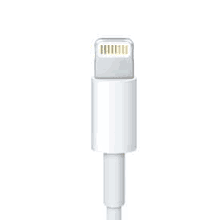
Lightning cable?

Apple Lightning cable connector, close-up on the metal contact pins

If your AirPods® Pro charge with a Lightning cable, that means you have either the 1st or 2nd generation.

3

Go by when you got them

AirPods® Pro 3 started shipping in late 2025. If you bought your AirPods® Pro before then, you almost certainly have the 1st or 2nd generation.

Ready to pick your Lump Wallet?

Choose your model below and we'll take you back to checkout with it selected.

AirPods® is a registered trademark of Apple Inc. Apple is not affiliated with, and does not sponsor or endorse, Lump Wallet or Strata Accessories.